The md5sum Command
Summary
The md5sum command creates a checksum for a file in the file path stated.
Basic command structure
For all descriptions below, the dollar sign indicates that BASH command prompt.
$ md5sum [file path]
Note: The md5sum command can be used to generate checksum for multiple files. For example, one simple way to generate checksums for all the files in a directory is to first navigate to the directory, use the command $ md5sum * > md5checksums.txt, it will generate the checksums for all the files in the directory and save it to the txt file.
Possible Flags
-c
The -c flag reads MD5 sums from given files and then checks them.
-b
The -b flag reads the result in binary mode. On Windows all files are read in binary mode, while on other OSes the files are read in the default mode. This flag specifies that the files would be read in binary mode.
-quiet
The -quiet option is useful only when verifying checksums. It prohibits printing OK for each successfully verified file. It can be useful when verifying many files and you only wanted to be alerted to failed verification rather than successful ones.
Examples
-
If you want to perform checksum on a single file, start going to the directory where your file is located at or simply specifying the file path and perform $
md5sum [file]
-
To get a checksum report for all the files in a directory, start going to the directory. If you’d like, you can use a redirect, such as
>to send the output to a text file. Here’s an example also shown in the image above: $md5sum * > mdchecksums.txt. It will then create a txt file named mdchecksums and contain all the checksums of the files in the directory. To view the result of the txt file, use nano mdchecksums.txt. Below is the content of the txt files generated.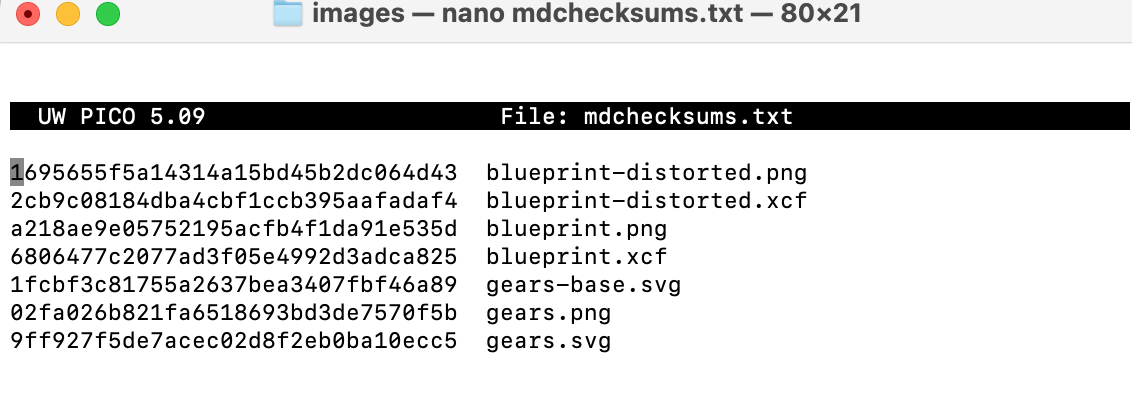
Go back to the main list of commands